Articles
Daylight Savings Time and Time Zones
Oct 20, 2026
PTLevel and Daylight Savings Time: Understanding Time Zones and Graphs The PTLevel device uses UTC +/- time zones for logging data, which means daylight savings time (DST) is not automatically accounted for. This guide will explain how this affects ...
PTLevel and Daylight Savings Time: Understanding Time Zones and Graphs
The PTLevel device uses UTC +/- time zones for logging data, which means daylight savings time (DST) is not automatically accounted for. This guide will explain how this affects your data display, how the graph plotting works, and how to adjust your time zone settings in your account.
How Daylight Savings Time Affects the PTLevel
When daylight savings time begins or ends, the PTLevel does not automatically adjust to the time change. Instead, it continues logging data according to the UTC +/- offset you’ve selected. As a result:
- During DST, your graphs may appear shifted by an hour compared to your local time.
- You’ll need to manually update your time zone settings if you want the graph to align with your current local time.
Understanding the Graph Plotting System
The PTLevel graph displays data based on hourly averages, but there’s an important detail about when data is plotted:
- If a water event occurs between 7:00 am and 7:59 am, it will be averaged and plotted as a single point labeled at 7:00 am.
- The full hour must elapse before a plot is created. For example, if you take a shower at 7:15 am and the water level drops, the change will appear on the graph at 7:00 am.
- When a time change (like daylight savings) occurs, the data remains aligned to the UTC-based time zone, which can cause a one-hour discrepancy until the time zone setting is updated.
By understanding this system, you can better interpret your water usage trends and ensure accurate monitoring.
How to Update Your Time Zone
To adjust the time zone for your PTLevel device, follow these steps:
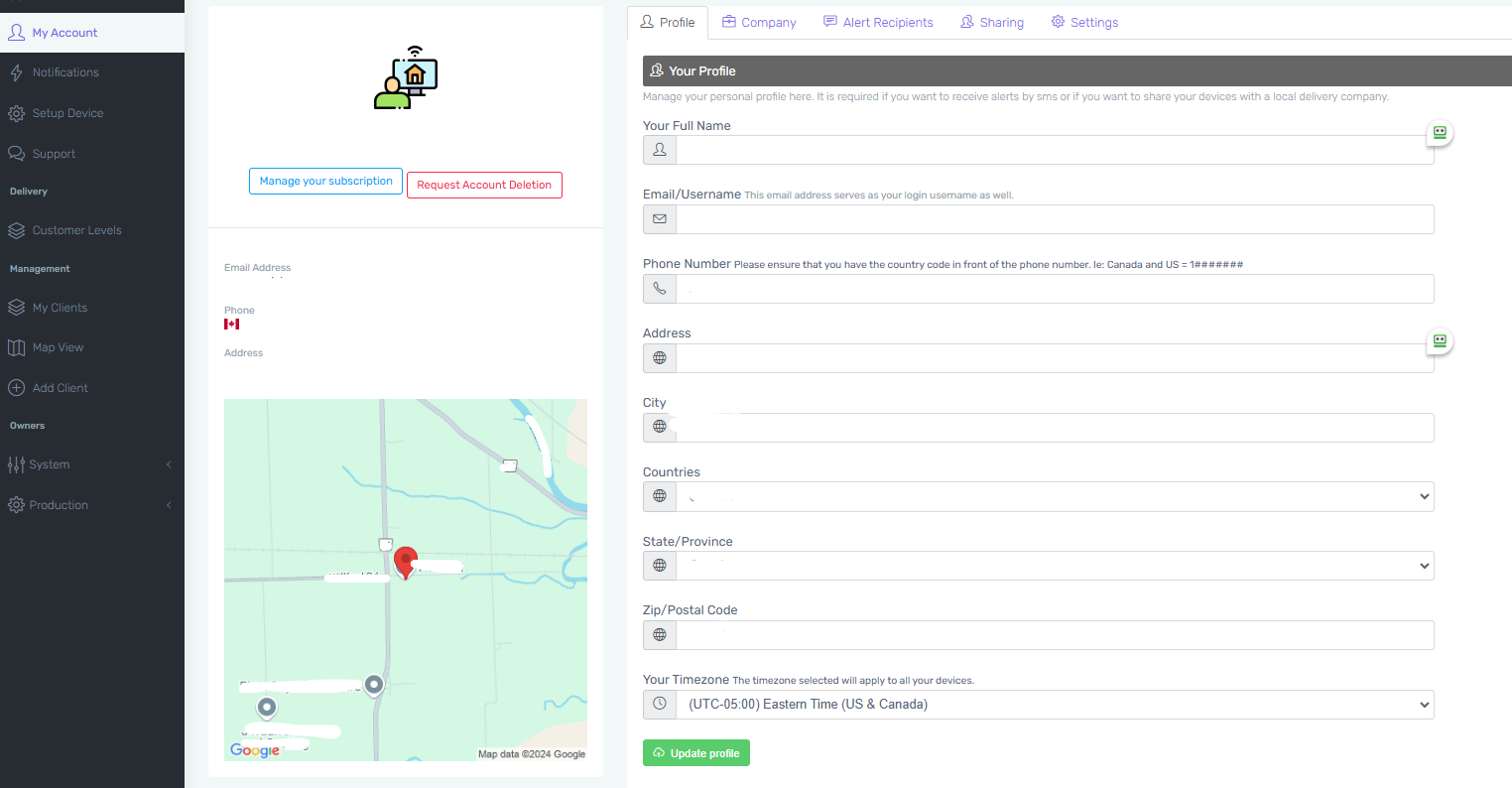
- Log in to your account at ptdevices.com or through the PTLevel app.
- Navigate to My Account in the menu on the left-hand side.
- Select the Profile tab at the top of the screen.
- Locate the Your Time Zone section near the bottom of the page.
- Choose the appropriate time zone for your location from the dropdown menu. If daylight savings time is active, select the UTC offset that matches your current local time.
- Click Update Profile to save your changes.
By keeping your time zone settings up to date, you’ll ensure your graphs accurately reflect your local time, even during daylight savings changes.
Need Help?
If you have any questions or need further assistance, feel free to reach out to our customer support team. We're here to help!